Showcase Application
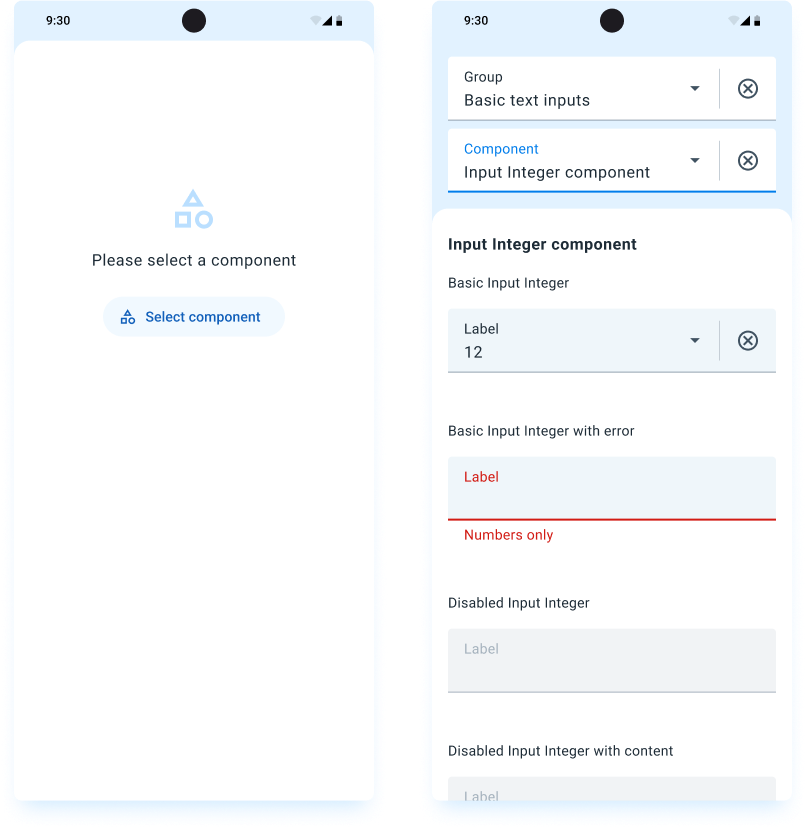
The Mobile UI library includes an application that showcases all the components available in the library. This application allows you to see the components in action and understand how they can be integrated into your projects.
Downloading the Showcase Application
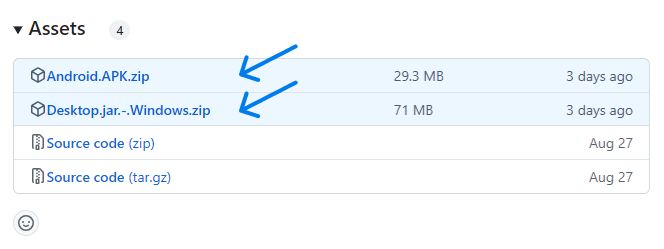
Each release of the Mobile UI library provides artifacts for various targets, including Android and desktop platforms. You can download the Showcase application from the Assets section at the bottom of each release page on GitHub.
Steps to Download:
- Visit the Releases Page: Go to the Mobile UI releases page on GitHub.
- Select a Release: Choose the release version you are interested in.
- Scroll to Assets: At the bottom of the release notes, find the Assets section.
- Download the Artifact: Click on the appropriate file for your platform:
- Android: Download the
Android.APK.zipfile. - Desktop (Windows): Download the
Desktop.jar.-.Windows.zipfile.
- Android: Download the
Installing the Showcase Application
On Android:
- Unzip the APK: Unzip the
.zipfile to extract the.apkfile inside. - Transfer the APK: Move the downloaded
.apkfile to your Android device if you downloaded it on another device. - Enable Unknown Sources: On your device, go to Settings > Security, and enable Unknown Sources to allow installations outside of the Google Play Store.
- Install the APK:
- Open a file manager app and navigate to the
.apkfile. - Tap the file to begin the installation process.
- Follow the on-screen instructions to complete the installation.
- Open a file manager app and navigate to the
On Desktop:
-
Ensure Java is Installed:
- The Showcase application requires the Java Runtime Environment (JRE) to run.
- Download and install Java from the official website if you haven't already.
-
Extract the ZIP File:
- Locate the downloaded
.zipfile. - Right-click and select Extract All, or use your preferred extraction tool to unzip the contents.
- Locate the downloaded
-
Run the JAR File:
- Open the extracted folder to find the
.jarfile. - Double-Click Method:
- Simply double-click the
.jarfile to launch the application.
- Simply double-click the
- Command Line Method:
- Open a terminal or command prompt.
- Navigate to the directory containing the
.jarfile. - Run the command:
java -jar your-showcase-application.jar
Note: If double-clicking the
.jarfile doesn't work, ensure that the file association for.jarfiles is correctly set to the Java Runtime Environment. - Open the extracted folder to find the
Using the Showcase Application
- Launch the App: Open the Showcase application on your device.
- Explore Components: Browse through the various components showcased in the app.
- Interactive Examples: Interact with the components to see how they behave and respond.