Configure OpenID / Oauth
Configure OpenID / OAuth
Since version 2.4, the DHIS2 Android app supports login with an OpenID Connect or OAuth 2.0 provider. This feature is not available by default — you need to supply the configuration described below and distribute your own APK. OpenID Connect must also be enabled on the DHIS2 web server and the user's OpenID parameter must be configured.
Configuration
All OpenID configuration is supplied via environment variables (or local.properties for local
development). The build script reads these values and embeds them in BuildConfig at compile time.
Environment variables
| Variable | Required | Description |
|---|---|---|
OPEN_ID_TYPE | Yes | Mode: discovery (recommended) or token |
OPEN_ID_SERVER | Yes | Your DHIS2 server URL |
OPEN_ID_CLIENT | Yes | Client ID from the auth provider |
OPEN_ID_REDIRECT_URI | Yes | Redirect URI registered with the auth provider |
OPEN_ID_AUTH_SCHEME | Yes | URI scheme of the redirect URI (e.g. com.googleusercontent.apps.CLIENT_ID_PREFIX) |
OPEN_ID_DISCOVERY_URI | Discovery mode | OpenID discovery endpoint (e.g. https://provider/.well-known/openid-configuration) |
OPEN_ID_AUTHORIZATION_URL | Token mode | Authorization endpoint URL |
OPEN_ID_TOKEN_URL | Token mode | Token endpoint URL |
OPEN_ID_BUTTON_TEXT | No | Custom label for the OpenID login button |
OPEN_ID_PROMPT | No | OpenID prompt parameter (e.g. login, consent, select_account) |
For local development you can place the same key-value pairs in local.properties at the project
root instead of setting environment variables. The build script checks environment variables first
and falls back to local.properties.
Discovery mode vs Token mode
Set OPEN_ID_TYPE to choose how the app locates the provider endpoints:
discovery(recommended) — supplyOPEN_ID_DISCOVERY_URI. The app fetches the provider's metadata document at startup and resolves the authorization and token endpoints automatically.token— supplyOPEN_ID_AUTHORIZATION_URLandOPEN_ID_TOKEN_URLdirectly, without a discovery document.
Use discovery whenever the provider publishes a .well-known/openid-configuration endpoint.
Google example (discovery mode)
# local.properties or environment variables
OPEN_ID_TYPE=discovery
OPEN_ID_SERVER=https://play.dhis2.org/android-current
OPEN_ID_CLIENT=CLIENT_ID_PREFIX.apps.googleusercontent.com
OPEN_ID_REDIRECT_URI=com.googleusercontent.apps.CLIENT_ID_PREFIX:/oauth2
OPEN_ID_AUTH_SCHEME=com.googleusercontent.apps.CLIENT_ID_PREFIX
OPEN_ID_DISCOVERY_URI=https://accounts.google.com/.well-known/openid-configuration
OPEN_ID_BUTTON_TEXT=Login with Google
AndroidManifest.xml
The app's AndroidManifest.xml already contains the RedirectUriReceiverActivity declaration.
The redirect URI scheme is injected automatically from OPEN_ID_AUTH_SCHEME — no manual editing
of the manifest is required.
For reference, the relevant activity entry looks like:
<activity android:name="net.openid.appauth.RedirectUriReceiverActivity" android:exported="true"
    tools:node="replace">
    <intent-filter>
        <action android:name="android.intent.action.VIEW" />
        <category android:name="android.intent.category.DEFAULT" />
        <category android:name="android.intent.category.BROWSABLE" />
        <data android:scheme="${openIdAuthScheme}" />
    </intent-filter>
</activity>
Advanced: hardcoding OidcInfo in source code
As an alternative to environment variables, you can hardcode the provider configuration directly in
login/src/commonMain/kotlin/org/dhis2/mobile/login/main/ui/screen/LoginScreen.kt by replacing
the body of fixedOpenIdProvider:
// Discovery mode
private fun fixedOpenIdProvider(oidcInfo: OidcInfo): OidcInfo =
    OidcInfo.Discovery(
        server = "https://play.dhis2.org/android-current",
        loginButtonText = "Login with Google",
        clientId = "CLIENT_ID_PREFIX.apps.googleusercontent.com",
        redirectUri = "com.googleusercontent.apps.CLIENT_ID_PREFIX:/oauth2",
        discoveryUri = "https://accounts.google.com/.well-known/openid-configuration",
        prompt = null,
    )

// Token mode
private fun fixedOpenIdProvider(oidcInfo: OidcInfo): OidcInfo =
    OidcInfo.Token(
        server = "https://your.dhis2.server",
        loginLabel = "Login with MyProvider",
        clientId = "your-client-id",
        redirectUri = "your.app.scheme:/oauth2",
        authorizationUrl = "https://provider/oauth2/authorize",
        tokenUrl = "https://provider/oauth2/token",
        prompt = null,
    )
You still need to set OPEN_ID_AUTH_SCHEME (or the manifestPlaceholders["openIdAuthScheme"]
value in app/build.gradle.kts) to match the URI scheme in redirectUri, so the OS can redirect
back to the app after a successful login.
This approach is not recommended. It embeds credentials in source code, complicates multi-environment builds, and requires a code change to rotate any value. Prefer environment variables for all production and CI/CD builds.
Login screen
When the configuration is present, a new button is displayed on the login screen.
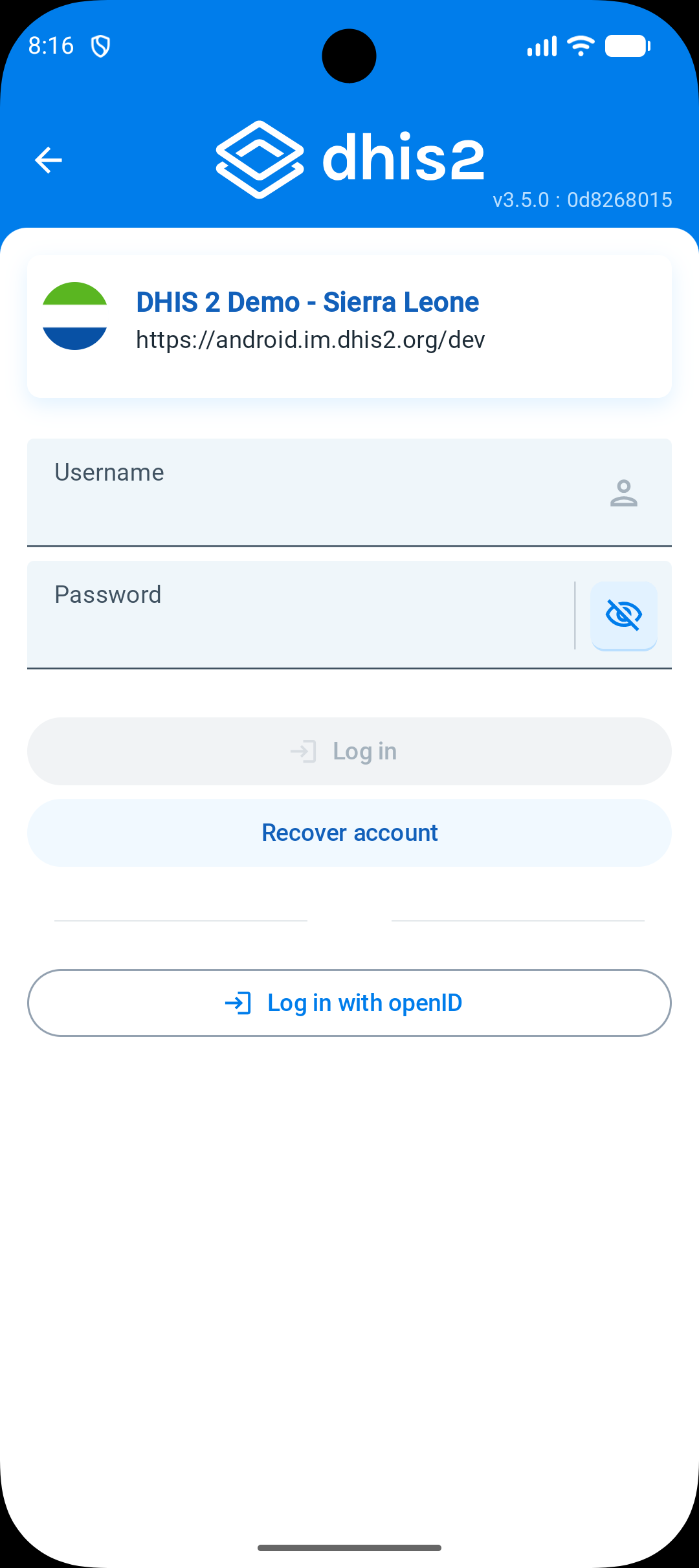
OpenID providers and configuration guidelines
Here you will find a list of available providers and how to obtain the values needed for the configuration variables above.