Building my first DHIS2 app with AI

From idea to implementation
I started this little experiment as a test to see how close I could actually come to developing an app that would actually open and work in DHIS2. I didn’t have high expectations, I mostly just wanted to take the DHIS2 skills for a little test drive and see what they could do. After a couple of days I was pleasantly surprised with the result, a fully working app that might actually be useful for end users. To be clear, I still consider this a beta version that needs much more refining, however as an exercise for understanding more about the realm of possible, it was a total success.
The starting point: A vague but real problem
I have been working on the next generation of the Maintenance app for DHIS2 for some time now, which is the main place for creating, updating and managing metadata within DHIS2. The new Metadata Management App is more a less a like for like replacement for the old maintenance app and is basically built around individual lists of all the different metadata objects that make up DHIS2.
Long-running DHIS2 instances accumulate metadata over years and the relationships between them become incredibly tangled. Integrity issues can pile up duplicate data elements, orphaned objects that reference nothing and are referenced by nothing sit quietly taking up space.
We have the Metadata integrity checks that can help admins identify predefined known issues like orphaned category options and duplicates but it can be difficult for administrators to tell what's safe to delete because they can't see what depends on what, and what might be locked because there is data recorded against it.
I’ve had this idea in the back of my head for a while, what if we could use a graph to visualise the metadata in a way that might make dependency between objects clearer and allow admins to identify issues and see the relationships at the same time to help with clean up. No one was asking for this so it wasn’t going to end up on the roadmap and the developers were busy delivering the app, so this remained just an idea… until my new friend Claude came to town.
Step One: Don't start with code - Start with questions
Instead of opening up claude code and asking it to build the app, first I wanted to use cowork to explore the idea and find out what was even possible.
The first thing I did was invoke the Grill Me skill ( Available here https://github.com/mattpocock/skills) in Claude's Cowork mode alongside the DHIS2 App Development skill. Rather than asking Claude to start building, I described the idea and asked it to interrogate me.
The Grill Me skill is designed to surface every assumption you haven't examined yet, it doesn't accept vague answers and won't let you move to the next branch of the decision tree until the current one is resolved.
I had some previous experience with graph databases and my starting point was to look at the Neo4 platform. The first question that emerged immediately reframed the whole project: where does the graph actually live?
The DHIS2 App Development skill knows the platform's constraint that a DHIS2 embedded app ships as a .zip, runs in the browser, and has no backend. Neo4j requires a server. That constraint alone changed the entire architecture before I'd made a single decision about features.
How the interrogation shaped the spec
What followed was a structured conversation that worked through the decision tree branch by branch. Looking back, the discussion moved through three distinct phases.
Phase one was constraint discovery. Establishing what the platform actually allows. An embedded app must be self-contained. Authentication is handled natively by DHIS2. There's no place to run a graph database. This forced a pivot: what are open source alternatives that can run in browser within the DHIS2 App Platform. Claude found me Graphology, a JavaScript graph library that runs in-browser, with Sigma.js as a WebGL renderer. Importantly, Graphology is Sigma's native format: no adapter layer, no translation step.
Phase two was scope definition. This is where the Grill Me helped to refine the idea
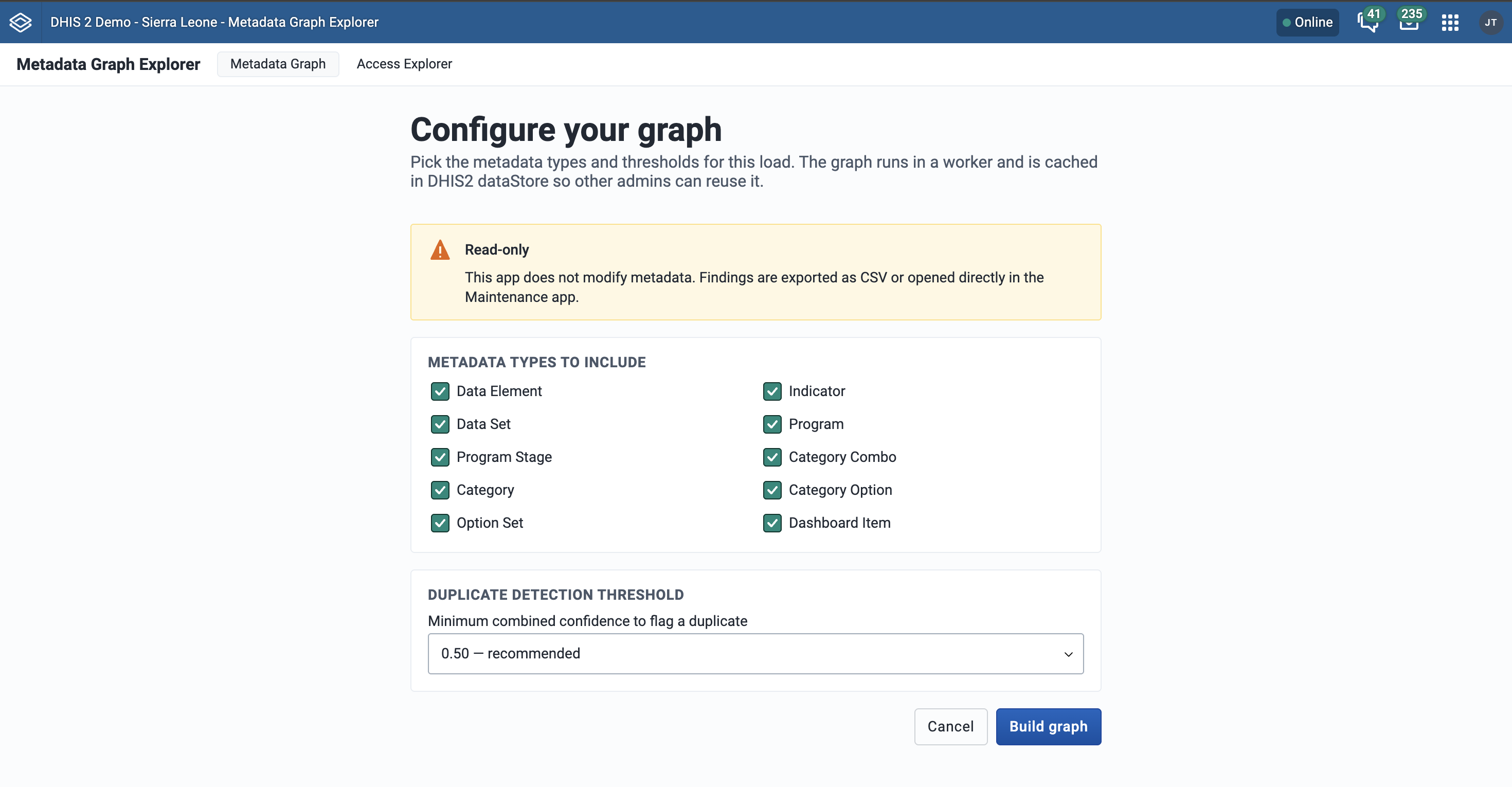
- Which metadata types actually matter for the core use case? We landed on data elements, indicators, programs, category combinations, categories, and category options. That might be enough to trace the main dependency chains without loading the entire instance on first render.
- Should org units and users be included as nodes and relationships? Yes, but they serve a different purpose. Understanding sharing and access rather than metadata integrity. The interrogation identified this as a fundamentally separate mode, which became the Access Explorer, kept independent from the Metadata Graph to avoid conflating two different administrative workflows.
- What about duplicates? Integrity checks can highlight true duplicates (same value type, domain type, category combo) but I wanted to add fuzzy name similarity, and crucially, a combined confidence score that gives admins a sliding scale rather than a binary flag.
- Should this app fix problems or be read only? This was a crucial step, for this first version I was clear I wanted this to be a tool admins could use to find issues, then be guided to the right place in the Metadata Management App to fix them. Maybe later iterations would include a way to generate scripts that could be used to fix the issues, helpful for managing changes across multiple instances, but for now it would be read only.
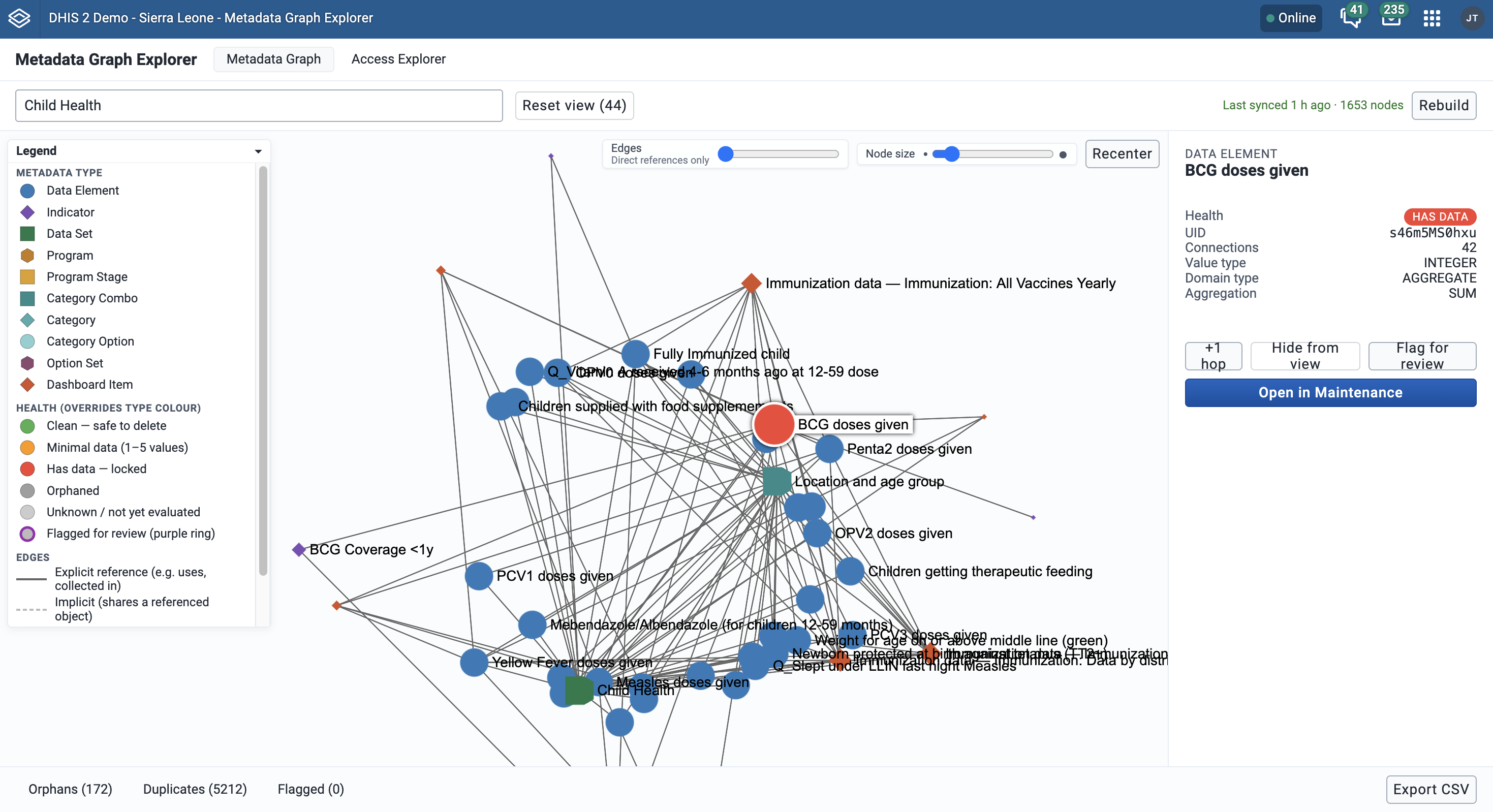
Phase three was interaction design. The graph of a real DHIS2 instance can have thousands of nodes and rendering all of them at once was immediately ruled out as a performance issue. So I decided to start with a search-first model where the user searches for a metadata object, the app renders that node plus its direct neighbours, and the graph expands incrementally as the admin clicks into it. I wasn’t 100% sure that was the right starting point, maybe it could start with showing metadata that met some other criteria for example, but the beauty of this process is that I could just try it out, see how it looked, and then iterate later. Since I wasn’t relying on developer effort to build this, the equation for getting the design right the first time shifts and allows for more experimentation.
The Architecture Decision Record: Making choices explicit
One of the most valuable outputs of this process that I would not have thought of at all is what ended up as Section 2 of the spec: an Architecture Decision Record. Every significant technical choice is recorded as a table row with three columns: the decision, the choice made, and the rationale.
This sounds simple but it's transformative in practice. When the first build crashed the browser, I knew exactly why: Cytoscape.js, the renderer that had been used, degrades past roughly 500 nodes because it uses Canvas and SVG rather than WebGL. The ADR made the reasoning explicit, which meant the fix was also explicit, replace Cytoscape.js with Sigma.js, move graph construction to a Web Worker so it runs off the main thread, and enforce the subgraph rendering model so Sigma never tries to render the full graph at once.
That crash happened after the spec was handed to a coding agent. The spec had anticipated the performance problem in principle but the original renderer choice was wrong. The point is: having the ADR meant the recovery was fast. The reasoning was documented, the trade-offs were visible, and the fix was architectural rather than a patch.
The spec as a handover document
The final spec document runs to around eighteen sections. It covers the tech stack, the project directory structure, the full list of DHIS2 API queries needed (with fields, paging, and filter parameters), the graph construction logic, the Web Worker architecture (including the actual hook implementations), the duplicate scoring algorithm, the visual encoding model for Sigma's node and edge reducers, the DataStore cache strategy, the navigation and interaction model, the CSV export format, and a phased implementation plan.
This level of detail might seem excessive, but it's the detail that makes the handover to a coding agent reliable. The spec answers the questions an AI code generator would otherwise have to guess at:
- What does the Sigma
nodeReducerneed to return for a flagged node? - How does the Web Worker serialise the graph for transfer back to the main thread?
- What is the DataStore namespace and key structure?
- What DHIS2 API endpoint gives you the data volume for a data element, and when is that call made?
- How does the duplicate confidence score combine structural and name-similarity signals?
When these questions are answered in the spec, the coding agent builds the right thing the first time. When they aren't, the agent guesses and those guesses compound across a codebase until the whole thing needs rethinking.
What this process is, and what it isn't
This method is not about using AI to think for you. The decisions that shaped this spec like what metadata types to prioritise, what the dual-mode architecture looks like, how duplicate scoring should work, what the interaction model should be, were all made by a person. The AI's role was to ask the right questions in the right order, surface the implications of each choice before it was committed to, and then capture the decisions in a format precise enough to be executed.
The Grill Me skill is useful precisely because it is adversarial by design. It assumes your first answer is incomplete and your second answer has unexplored branches. It keeps asking until the decision tree is resolved. That pressure is uncomfortable but it is also where the real thinking happens.
The DHIS2 App Development skill adds a different kind of value: it knows the platform's constraints and conventions deeply enough to catch architectural mistakes before they become code. The Neo4j pivot happened in the first exchange. Without that constraint knowledge, I might have wasted time trying to build toward a backend architecture or thrown out the idea altogether.
The method summarised
If I were to reduce this to a repeatable process, it looks like this:
Start with a description of the problem and the outcome you want, not a description of the solution. Bring in the DHIS2 App Development skill that knows the platform's constraints so technical dead ends are caught early. Use a structured interrogation approach to work through the decision tree branch by branch, prioritising scope, establishing architectural constraints, and surfacing the interaction design before thinking about implementation. Capture every decision in an Architecture Decision Record with explicit rationale. Build a spec document that answers not just "what to build" but "how the code should work" API queries, data structures, hook interfaces, rendering logic. Then hand that document to a coding agent and build.
The spec is not a design document in the traditional sense. It is a contract between the human who understood the problem and the AI that will implement the solution. The more precisely that contract is written, the less room there is for the agent to diverge from the original intent.
The Result
The app was built and packaged as a zip file that I was able to manually install via the App Management app in the DHIS2 play environment. The first two times I tried to open the app I got errors, and honestly my first reaction was “ahhh ok so this isn’t that easy, oh well it was worth a shot.” But I fed the errors back into claude and it rebuilt the app in a few seconds and on the third attempt the app opened! It felt pretty good to see the app load and look like a proper app, woo hoo!
I played around with it a little and then asked to add a few new features, for example; different shapes for different objects and sliders to be able to choose the depth of relationships that show as edges and another slider for the size of nodes to make the graph more readable. It was very fast to edit the code to make those changes and then redeployed the package.
Click here to download and try the app for yourself.
Conclusion
The app still needs some work to make it properly useful for system admins, but given that I started this experiment with the goal of just seeing if I could use these new tools to make an app that would just open, I am quite amazed that I am now even thinking about this being a proper app.