Updating App Hub Guidelines for External Service Integrations

To ensure high quality of the apps on the App Hub, we have made updates to the App Hub security guidelines for apps that communicate with external services. Apps that connect to external APIs must no longer handle third-party credentials in browser-accessible storage for direct client-side use. Instead, external-service communication should be performed through DHIS2 Routes so that credentials and upstream authentication live on the server side, and access can be controlled through DHIS2 authorization and sharing.
This change is reflected in the updated App Hub Submission Guidelines. The use of hard-coded secrets is discouraged, and server-side synchronization processes are strongly recommended rather than browser-based ones.
We recommend that all app maintainers implement these new security updates by mid-June 2026 (ahead of the DHIS2 Annual Conference). After the annual conference, the DHIS2 Extensibility Team will review all of the apps on the App Hub, and remove all apps that do not follow the updated security guidelines. To help with the migration, we have included an example of the old pattern and how it can be updated using routes.
The old pattern
A common older pattern has been to store API tokens or similar configurations in the DataStore or UserDataStore, read those values in the browser, and then send requests straight to the external service. Even when data store values are encrypted at rest, the core issue remains: if the browser can read a credential, the browser can expose said credential through network requests, logs or browser tooling.
1. User enters credentials through app UI
One common pattern was for apps to have dedicated UI pages where the user would fill in URL, username and password for the external service. In some cases this was configured manually in the data store instead, but the effect is the same.
2. Credentials are persisted in the UserDataStore
The credentials were then written to the DHIS2 UserDataStore (or DataStore) under an app-specific namespace. At runtime, the app reads them back, delivering the plaintext values straight into the browser.
3. The app calls the external API directly
With the credentials now available, the app authenticates against the external service and makes requests directly from the browser. This is typically implemented by reading credentials from the data store, attaching them to outbound requests, and then calling the third-party API from frontend code.
Regardless of which client-side data library is used, this pattern still exposes plaintext credentials to the browser runtime.
Even though the data store may encrypt values at rest on the server (by setting the ?encrypt=true query string parameter), the browser receives plaintext credentials to use them. From that point they are visible in JavaScript memory, network request payloads, console logs, and any XSS vulnerability.
The new required pattern using Routes
With DHIS2 Routes, the DHIS2 server acts as a proxy. Credentials are stored server-side and never sent to the browser once the route has been configured.
1. A DHIS2 system administrator creates the route
This is done once, and can be done either through the Route Manager App (available on the App Hub) or directly via the API:
POST /api/routes
{
    "name": "External Service",
    "code": "external-service",
    "url": "https://external-service.example.com/api/**",
    "auth": {
        "type": "http-basic",
        "username": "admin",
        "password": "mySecretPassword"
    },
    "authorities": ["MY_APP_AUTHORITY"]
}
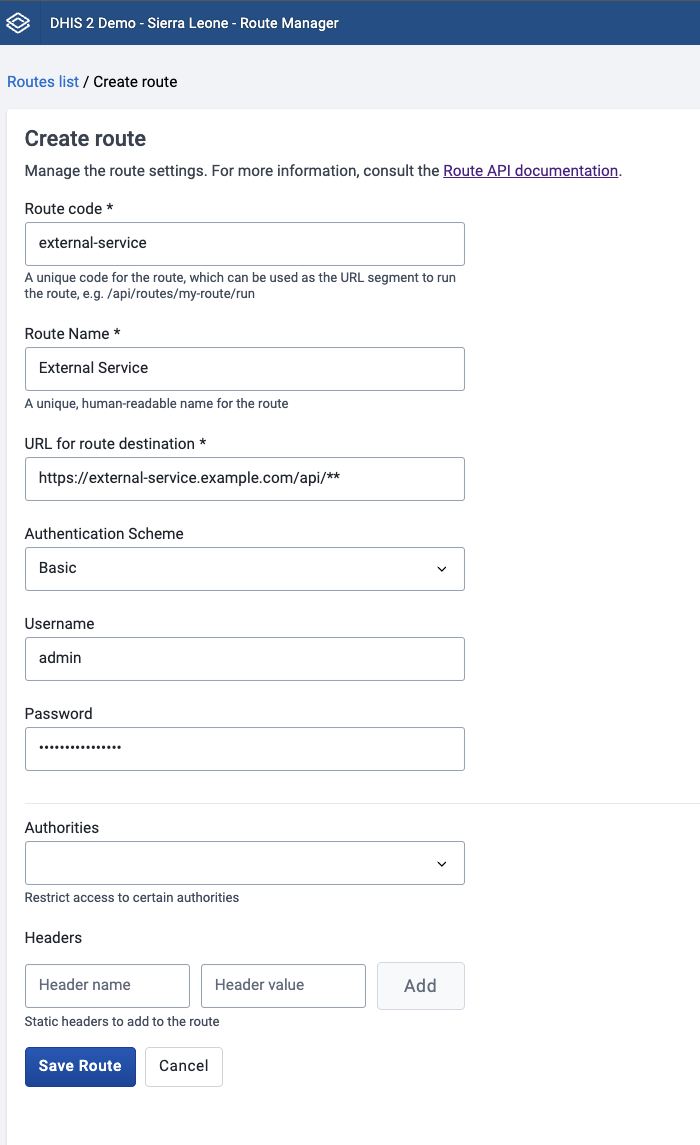
A few things to note:
- the
**wildcard means sub-paths are passed through to the upstream service. More information can be found in the routes documentation - The credentials are encrypted on the server and cannot be read back via the API
- The
authoritiesarray lets users with that authority run the route without needing full route-management permissions. - Several authentication modes are supported, like
http-basic,api-tokenandoauth2-client-credentials.
The DHIS2 server must also allow the target host in dhis.conf:
route.remote_servers_allowed = https://external-service.example.com/
As of DHIS2 v42 and later, the default permitted routes are https://*, so you may not need change the config if you are on a newer version of DHIS2.
2. The app can then call the external service through the route
import { useDataQuery } from '@dhis2/app-runtime'

const eventsQuery = {
    events: {
        resource: 'routes/external-service/run/events',
    },
}

export const useExternalEvents = () => {
    const { data, loading, error } = useDataQuery(eventsQuery)

    return {
        events: data?.events,
        loading,
        error,
    }
}
The app will now only talk to the DHIS2 server, and the server will handle the upstream authentication. The app will therefore no longer need to maintain credential input forms, fetch credentials from the Data store, or make direct requests to external services.
Are you maintaining an app? This is what you should check
Before submitting or updating an app on the App Hub, you should check the following:
- Does the app read third-party credentials in browser code?
- Does the app call an external API directly from the frontend?
- Can that communication be replaced with a DHIS2 route? If so:
- Remember to configure
route.remote_servers_allowedon the server. - Restrict route creation and editing to appropriate administrators.
- Remember to configure
If you have any questions about migrating your app, please reach out on the DHIS2 Community of Practice.